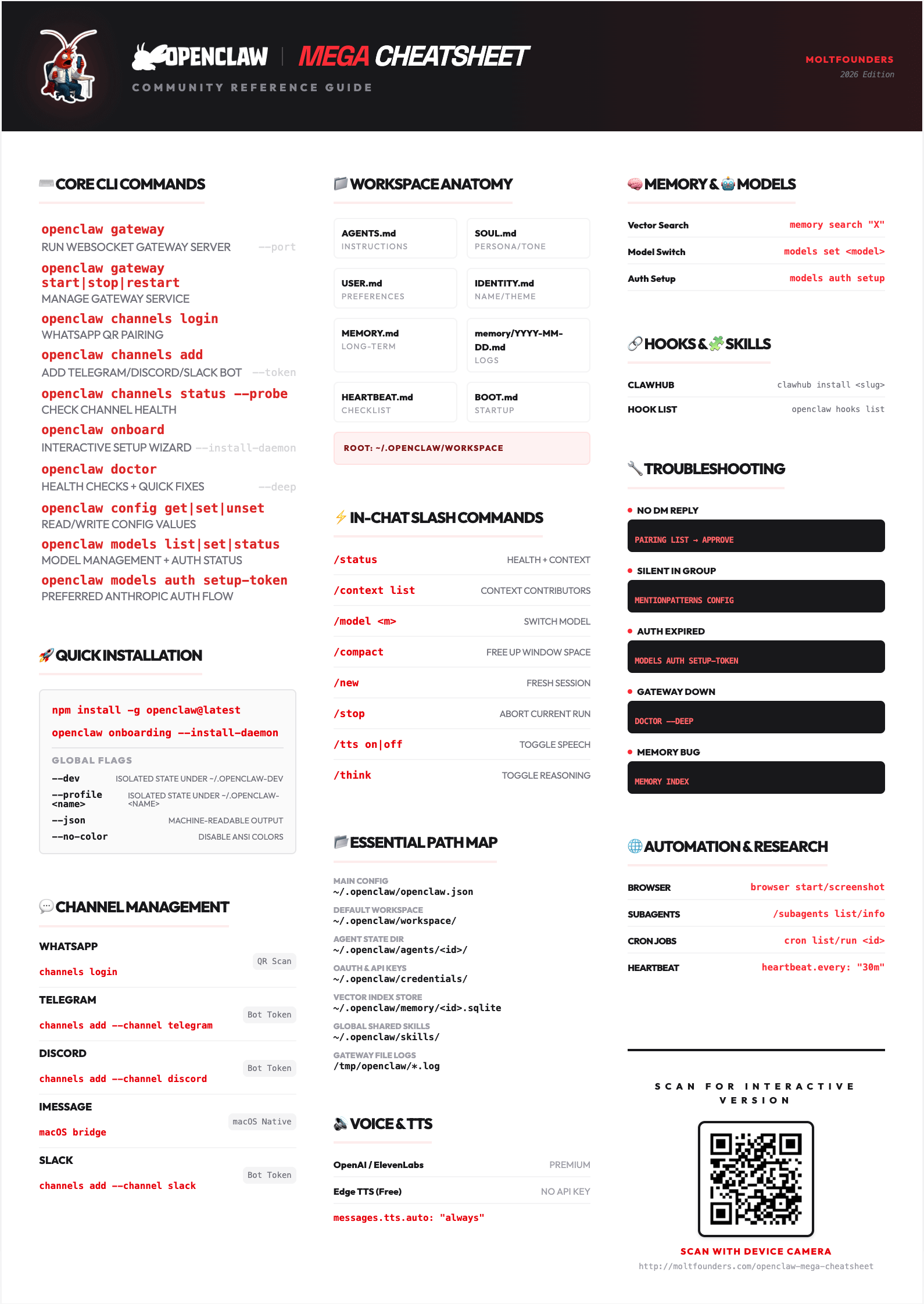
OpenClaw Mega Cheatsheet
The OpenClaw cheatsheet. Every command, one page.
CLI and slash commands, workspace files, memory, models, sessions, automations, hooks, skills, multi-agent routing, sandboxing and the fixes you will need at 2am. Search it, copy a command, get back to work.
- Commands
- 127
- Sections
- 21
- Slash commands
- 22
Quick start
#Install (macOS / Linux)
curl -fsSL https://openclaw.ai/install.sh | bashOr try it without installing
npx openclaw@latestFirst run
- 1
Guided setup
openclaw onboard - 2
Run the Gateway as a service
openclaw gateway install - 3
Check it listens on 18789
openclaw gateway status - 4
Open the Control UI
openclaw dashboard
Onboard flags
--classic- Full step-by-step wizard
--flow quickstart- Classic wizard with minimal prompts
--flow manual- Full prompts for port, bind and secret storage
--flow import- Migrate from another assistant (e.g. --import-from hermes)
--mode remote --remote-url <wss://…>- Connect to a remote Gateway
--non-interactive --accept-risk- Scripted setup
--install-daemon- Install the Gateway service during setup
--skip-channels- Skip channel setup
Core CLI
#openclaw gateway --port --bind --tokenRun the Gateway in the foreground
openclaw gateway install --forceInstall the service (launchd, systemd, Scheduled Task)
openclaw gateway start|stop|restartControl the installed service
openclaw gateway status --require-rpcRuntime, connectivity and capability
openclaw gateway probeIs the Gateway reachable, and with what scope?
openclaw setup --baselineRepair or redo setup without the wizard
openclaw configureChange model auth, gateway, channels, plugins or skills
openclaw doctor --fix --deep --lintHealth checks, migrations and quick fixes
openclaw triageSanitized, agent-ready diagnosis and support archive
openclaw status --all --deep --usageFull, shareable report
openclaw config get|set|unset|patch --dry-runRead or write openclaw.json
openclaw config validateCheck the config against the schema
openclaw channels addAdd a channel account (guided without flags)
openclaw channels status --probeLive per-account channel health
openclaw models status --probeResolved default, fallbacks and auth
openclaw agents list --bindingsAgents and the traffic they own
openclaw sessions --all-agents --jsonStored sessions across agents
openclaw logs --followTail Gateway logs
openclaw security audit --deep --fixAudit config for foot-guns
openclaw backup create --dry-runBack up config, state and workspace
openclaw update --channel beta --dry-runUpdate OpenClaw
openclaw reset --scope config|config+creds+sessions|fullReset part or all of the install
Global flags
--dev- Isolate state under ~/.openclaw-dev, Gateway on port 19001
--profile <name>- Isolate state under ~/.openclaw-<name>
--container <name>- Run the CLI inside a Podman or Docker container
--log-level <level>- Override the log level for this run
--no-color- Disable ANSI colors (NO_COLOR=1 also works)
--update- Shorthand for openclaw update
-V, --version, -v- Print the version and exit
Power commands
#openclaw plugins list|install|enable|disableManage plugins
openclaw plugins doctorDiagnose plugin load failures
openclaw approvals get|setExec approval policy
openclaw approvals allowlist add|removeExec allowlist entries
openclaw sandbox list|recreate|explainInspect or rebuild sandboxes
openclaw system event --text "X" --mode nowQueue a system event for the agent
openclaw system heartbeat last|enable|disableControl heartbeat runs
openclaw update status|wizard|repairUpdate channel, history and recovery
openclaw nodes list|pending|approveApprove and manage remote nodes
openclaw devices list|approve|rotate|revokeDevice token lifecycle
openclaw directory peers listResolve peer IDs before sending
openclaw secrets audit|reloadCheck and reload SecretRefs
openclaw gateway usage-cost --days 7 --agentToken spend by day
openclaw health --json --verboseDirect Gateway health check
openclaw tui --url --tokenTerminal UI; chat is tui --local
openclaw dashboardOpen the Control UI with the current token
Gotchas
models status --probe- Real requests: spends tokens, can hit rate limits
channels status --deep- Not supported; use --probe, or openclaw status --deep
security audit --fix- Writes changes to your config and permissions
doctor --fix --force- Applies aggressive config and state repairs too
Channels
#TelegramBot token- channels add --channel telegram --token <bot-token>
WhatsAppQR pairing- channels login --channel whatsapp
DiscordBot token- channels add --channel discord
SlackSocket Mode- channels add --channel slack
Signalsignal-cli- channels add --channel signal
iMessageimsg plugin- plugins install @openclaw/imessage
Google ChatPlugin- channels add --channel googlechat
Matrix, Teams, Feishu, LINE…Plugins- channels add, then pick from the list
Diagnostics
openclaw channels list --allConfigured and available channels
openclaw channels status --probeLive connection state per account
openclaw channels logs --channel all --lines 200Channel logs
openclaw pairing list telegramPending DM pairing requests
openclaw pairing approve telegram <code>Let a sender talk to the agent
Start with Telegram: it needs only a bot token and no plugin install.
Workspace files
#AGENTS.md- Operating instructions; its ## Tools section holds local tool notes
SOUL.md- Persona, tone and boundaries
USER.md- Preferences as dated directives (4,000-char budget)
IDENTITY.md- Agent name, vibe and emoji
MEMORY.md- Curated long-term memory (main private session only)
memory/YYYY-MM-DD.md- Daily notes, searched on demand
DREAMS.md- Dream Diary from memory consolidation
BOOT.md- Startup checklist (needs the boot-md hook)
BOOTSTRAP.md- First-run ritual; delete when done
skills/- Workspace skills; highest precedence
Default root: ~/.openclaw/workspace. HEARTBEAT.md is no longer read: doctor --fix moves it into the heartbeat monitor's scratch.
Memory
#MEMORY.mdbootstrap- Durable facts and decisions, loaded at session start
Daily notesmemory/*.md- Detailed context, indexed for search, not injected
Toolsmemory_search · memory_get- Semantic recall and exact file reads
Embeddingsmemory.search.provider- OpenAI by default; gemini, voyage, ollama, local…
Hybrid searchvectors + BM25- Ranked by relevance, recency and importance
Enginesbuiltin · Honcho- SQLite builtin by default; Honcho via plugin
Dreaming/dreaming- Background sweep that distils daily notes into MEMORY.md
Memory flushcompaction.memoryFlush- Saves context before compaction; on by default
openclaw memory status --deep --agentIndex and provider health
openclaw memory index --force --agentRebuild the index
openclaw memory search "query"Search from the CLI
Models & auth
#openclaw models list --all --refreshEvery available model
openclaw models set <model-or-alias>Set the default model
openclaw models set-image <model-or-alias>Set the default image model
openclaw models fallbacks add <model-or-alias>Append to the fallback chain
openclaw models fallbacks listShow the fallback chain
openclaw models auth login --provider <id>Sign in to a provider
openclaw models auth paste-api-key --provider <id>Store an API key
openclaw models auth order set --provider <id> <profiles…>Profile rotation order
openclaw models aliases add <alias> <model>Create a model alias
openclaw models status --probeLive-test configured auth profiles
Failover: a rate-limited or failing auth profile goes into cooldown and the next profile, then the next fallback model, takes over for that turn only.
Sessions
#session.dmScope- main (default) | per-peer | per-channel-peer | per-account-channel-peer
session.reset.mode- none (default) | daily | idle
session.reset.atHour- Hour for daily resets (default 4, Gateway local time)
session.reset.idleMinutes- Idle window; with daily, whichever expires first wins
session.resetByType- Overrides for direct, group and thread sessions
session.resetByChannel- Per-channel override
session.identityLinks- Link one person's identities across channels
openclaw sessions tail --followStream session activity
openclaw sessions compact "agent:main:main"Compact one session
openclaw sessions cleanup --dry-run --enforcePreview stale-session cleanup
Use per-channel-peer for multi-user inboxes, or one person's DMs leak into another's context.
Slash commands
#/statusRuntime status, plugin health, provider usage
/context listWhat fills the context window
/context detailSystem prompt and injected files
/model <model> -sSwitch model for this session (-a agent, -g global)
/modelsList available providers and models
/compact [instructions]Summarize older context
/new [model]Archive this session and start fresh
/reset [soft]Reset in place; soft keeps the transcript
/stopAbort the current run
/steer <message>Inject guidance into the active run
/btw <question>Side question without touching context
/think <level>Set the thinking level
/verbose on|offVerbose output; keep off in groups
/toolsWhat the agent can use right now
/usage tokens|full|costPer-reply usage footer
/goal start|status|completeDurable session goal
/loop [interval] <prompt>Repeat a prompt in this chat
/approve <id> <decision>Resolve an approval prompt
/send on|off|inheritSet send policy (owner)
/config show|setEdit openclaw.json (commands.config: true)
/debug show|setRuntime-only overrides (commands.debug: true)
/restartRestart OpenClaw
Text-to-speech
#OpenAIOPENAI_API_KEY- Reliable; also writes auto-summaries
ElevenLabsELEVENLABS_API_KEY- Voice cloning, multilingual
MicrosoftNo key- Edge neural TTS; best-effort, no SLA (was edge)
Local CLINo key- Runs a configured local TTS command
Speak every reply (off by default)
tts: { auto: "always", provider: "elevenlabs" }/tts status shows the current state; /tts audio <text> sends a one-off voice reply.
Logs & diagnostics
#openclaw logs --follow --local-timeTail Gateway logs
openclaw logs --jsonOne JSON event per line
openclaw logs --limit 500Cap the number of lines
openclaw channels logs --channel whatsappLogs for one channel
openclaw gateway stabilityRecent stability events
openclaw gateway diagnostics exportZip diagnostics for a bug report
OpenTelemetry export
openclaw plugins install clawhub:@openclaw/diagnostics-otel
# then in openclaw.json
diagnostics: { enabled: true, otel: { enabled: true, endpoint: "http://otel-collector:4318" } }
Browser
#openclaw browser start --headlessStart the managed browser
openclaw browser statusIs it running, and which profile?
openclaw browser tabsList open tabs
openclaw browser open <url>Open a URL in a new tab
openclaw browser navigate <url>Navigate the current tab
openclaw browser snapshotAccessibility snapshot with element refs
openclaw browser screenshot --full-pageCapture the page
openclaw browser click|type|hover <ref>Act on a snapshot ref
openclaw browser evaluate --fn '<js>'Run JavaScript in the page
openclaw browser pdfExport the page as PDF
openclaw browser profilesManaged and existing-session profiles
openclaw browser doctor --deepDiagnose browser setup
Automations
#openclaw automations list --allJobs, including heartbeat monitors
openclaw automations create "0 7 * * *" "<prompt>" --name <name> --agentSchedule an agent turn
openclaw automations show <job-id>Job details
openclaw automations edit <job-id>Change schedule, agent or delivery
openclaw automations enable|disable <job-id>Toggle a job
openclaw automations run <job-id> --waitRun a job now
openclaw automations runs <job-id> --status errorRun history
openclaw automations rm <job-id>Delete a job
openclaw cron is the same command. Automations need a running Gateway.
Hooks
#Bundled hooks
session-memorycommand:new, command:reset- Save recent conversation to workspace memory
boot-mdgateway:startup- Run BOOT.md when the Gateway starts
bootstrap-extra-filesagent:bootstrap- Add matching files to the bootstrap context
command-loggercommand- Append command events to a JSONL log
compaction-notifiersession:compact:*- Post compaction status notices
openclaw hooks list --eligibleDiscovered hooks that can run
openclaw hooks enable <name>Enable a hook
openclaw hooks disable <name>Disable a hook
openclaw hooks info <name>Hook details
openclaw hooks checkCheck eligibility
openclaw hooks install <path-or-spec>Install a hook pack
Events
command:new | reset | stop- The matching slash command runs
session:compact:before | after- Around compaction
agent:bootstrap- Before workspace files are injected
gateway:startup | shutdown- Gateway lifecycle
message:received | sent- Inbound and outbound messages
Skills
#Precedence
<workspace>/skills/- Workspace skills
<workspace>/.agents/skills/- Project agent skills
~/.agents/skills/- Personal agent skills
~/.openclaw/skills/- Managed skills, shared across agents
Workshop skills- Drafted with /learn
Bundled skills- Shipped with OpenClaw
skills.load.extraDirs- Extra directories and plugin skills
Install and manage
openclaw skills search "calendar"Search ClawHub
openclaw skills install @owner/<slug> --globalInstall into the workspace
openclaw skills update --allUpdate ClawHub installs
openclaw skills list --eligibleSkills the agent can use
openclaw skills checkMissing requirements
clawhub uninstall @owner/<slug>Remove a ClawHub skill (npm i -g clawhub)
SKILL.md frontmatter
---
name: my-skill
description: "What this skill does"
metadata: { "openclaw": { "requires": { ... } } }
---
Multi-agent routing
#agents.entries.<id>- Per-agent workspace, model, tools and sandbox
Isolated state- Each agent has its own sessions and auth profiles
bindings- Route traffic by channel, account, peer, guild or team
groupChat.mentionPatterns- Names that wake an agent in groups
Routing precedence
peer- Exact DM, group or channel id
parent peer- Thread inherits its parent
peer.id: "*"- Peer wildcard
guildId + roles- Discord guild and roles
guildId- Discord guild
teamId- Slack team
accountId- One channel account
accountId: "*"- Any account on the channel
fallback owner- The sole agent; several agents need a binding
openclaw agents add work --workspace ~/.openclaw/workspace-workAdd an agent
openclaw agents bind --agent work --bind telegram:opsRoute an account to it
openclaw agents bindingsCurrent routing
openclaw agents delete <id>Remove an agent
Heartbeat
#heartbeat.every- 30m by default, 1h with Anthropic OAuth; 0m disables
heartbeat.target- owner (default DM) | last | none | <channel id>
heartbeat.to- Explicit recipient, with target set to a channel
heartbeat.model- Cheaper model for heartbeat runs
heartbeat.lightContext- Skip workspace bootstrap files
heartbeat.isolatedSession- Fresh session per run, no history
heartbeat.activeHours- Only run inside a time window
Contract: reply NO_REPLY when nothing needs attention. Legacy HEARTBEAT_OK replies are still dropped.
Monitor checklist (replaces HEARTBEAT.md)
openclaw automations scratch <job-id> --set "Check inbox for urgent mail"Sandboxing
#sandbox.mode
"off"- No sandbox (default)
"non-main"- Sandbox every session except the main one
"all"- Every session runs sandboxed
sandbox.scope
"agent"- One container per agent (default)
"session"- One container per session
"shared"- One container for all sandboxed sessions
sandbox.workspaceAccess
"none"- Isolated sandbox workspace only (default)
"ro"- Agent workspace read-only at /agent
"rw"- Agent workspace read-write at /workspace
Backends: docker (default), podman, ssh, openshell, crabbox. Default image: openclaw-sandbox:bookworm-slim.
Sub-agents
#Parallel work- Research and slow tools without blocking the main run
Isolation- Own session; no session or message tools by default
Announce- Results post back to the requester
Auto-archive- After subagents.archiveAfterMinutes (default 60)
subagents.model- Run children on a cheaper model
/subagents listSub-agent runs in this session
/subagents log <id|#>Recent turns of a run
/subagents info <id|#>Run metadata
/agentsThread-bound agents for this session
sessions_spawn tool
sessions_spawn({ task, label?, agentId?, model?, thinking?,
  runTimeoutSeconds?, mode?: "run" | "session",
  context?: "isolated" | "fork", cleanup?: "delete" | "keep" })
Troubleshooting
#First 60 seconds
openclaw triage
openclaw status --all
openclaw gateway probe
openclaw doctor
openclaw channels status --probe
openclaw logs --follow
No DM reply- openclaw pairing list <channel>, then approve
Silent in a group- Mention gating: check requireMention and mentionPatterns
Auth failing- openclaw models status, then models auth login --provider <id>
Gateway down- openclaw gateway status; doctor --deep finds stray installs
Missing tools- Check tools.profile: minimal, messaging, coding or full
Memory not found- openclaw memory status --deep, then memory index --force
Context full- /compact, or /new for a fresh session
Broke after update- openclaw update status, then update repair
Universal fix
openclaw doctor --fixKey paths
#~/.openclaw/openclaw.json- Main configuration (JSON5)
~/.openclaw/workspace/- Default agent workspace
~/.openclaw/agents/<id>/agent/openclaw-agent.sqlite- Sessions, transcripts, local auth
~/.openclaw/state/openclaw.sqlite- Shared state and auth profiles
~/.openclaw/credentials/- Channel state, e.g. WhatsApp creds
~/.openclaw/skills/- Managed skills
~/.openclaw/sandboxes/- Sandbox workspaces
/tmp/openclaw/openclaw-YYYY-MM-DD.log- Gateway log (logging.file)
Never commit ~/.openclaw: it holds credentials, sessions and tokens.
Need the why, not just the what?
- 01Cost Optimization
- 02Agent Prompts
- 03Memory Configuration
- 04Heartbeat & Task Tracking
- 05VPS Deployment
- 06Security Hardening
- 07Skills & Tools
- 08Config Reference
Commands change fast; check openclaw --help and the official docs when one misbehaves.